*Colours can vary between different batches due to the manufacturing, processing and firing processes involved with tiles*
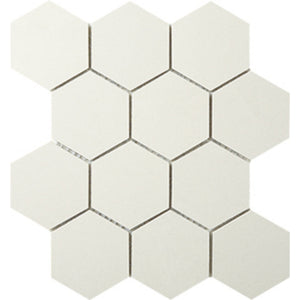
The Everstone Durastone Crema Luna Brushed Rockface 260x300mm Hexagon Mosaic Tile is a warm cream porcelain mosaic with large hexagon pieces in a combined brushed and rockface finish, designed to bring natural textural elegance to bathroom and living area walls and floors. Available in Crema Luna, Ash Grey, Botticino, Steel Grey, and Charcoal colourways. Each box contains 9 sheets covering 0.69sqm, ideal for premium hexagon mosaic installations.
Variations: V2 (Slight Variation - Pattern with Similarities)
*Colours can vary between different batches due to the manufacturing, processing and firing processes involved with tiles*
The Everstone Durastone Crema Luna Brushed Tile, in a 600x600mm square format, is crafted from durable porcelain and designed for modern elegance. The rectified edges provide a smooth, seamless look, while the brushed finish enhances the crema luna color with subtle texture and depth. Ideal for both walls and floors, these tiles are perfect for adding a contemporary touch to residential and commercial spaces. Each box delivers high-quality tiles that combine style with longevity.
Variations: V2 (Slight Variation - Pattern with Similarities)
*Colours can vary between different batches due to the manufacturing, processing and firing processes involved with tiles*
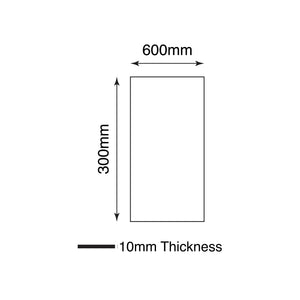
The Everstone Durastone Crema Luna Brushed Tile, sized at 600x300mm, combines elegance with durability in its porcelain construction. Featuring rectified edges for a seamless installation, these tiles showcase a brushed finish that adds texture and depth to the warm crema luna color. Perfect for creating a sophisticated ambiance, whether on walls or floors, these versatile tiles are ideal for both residential and commercial settings. Each box offers a stylish, enduring solution for modern interior designs.
Stay updated with the latest renovation trends and exclusive discounts.
Australia’s Largest Premium Bathroom Range Retailer
Opens in a new window.
PayPal Pay Later Messaging
Step 1: Choose message placement
Click the button below and then hover over your page to select a placement.
Step 2: Paste and save
You have copied the placement for the Product Page.
Go back to the App Embeds section, and in the Paypal Advanced Settings, paste the copied value into the
Product Page field and click the 'Save' button in the top right corner.