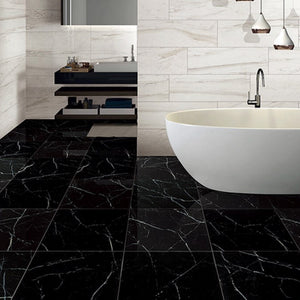
The Euromarmo series is a superb porcelain tiles collection which uses the latest innovative high definition digital glaze printing technology. It captures the natural beauty and ambience of European marble embracing the realistic natural stone fissures and depth, while providing superior durability at a low cost and with easy maintenance.
*Colours can vary between different batches due to the manufacturing, processing and firing processes involved with tiles*
The Everstone Euromarmo Nero Maquina Honed 600x600mm Square tile offers a sophisticated touch with its refined design. Made from high-quality porcelain, this tile features rectified edges and a honed finish, providing a smooth, honed surface with subtle elegance. The Nero Maquina color showcases a blend of black tones and delicate veining, emulating natural stone. Ideal for both floors and walls, each box includes tiles that combine durability with classic style, perfect for enhancing modern interiors.
*Colours can vary between different batches due to the manufacturing, processing and firing processes involved with tiles*
The Everstone Euromarmo Nero Maquina Honed 600x300mm Rectangular tile exudes modern sophistication with its sleek design. Crafted from high-quality porcelain, this tile features rectified edges and a honed finish, delivering a smooth, matte surface. The rich Nero Maquina color offers a striking, deep black hue that adds a dramatic touch to any space. Ideal for both floors and walls, each box contains tiles that combine luxury and durability, enhancing contemporary interiors with refined elegance.
Stay updated with the latest renovation trends and exclusive discounts.
Australia’s Largest Premium Bathroom Range Retailer
Opens in a new window.
PayPal Pay Later Messaging
Step 1: Choose message placement
Click the button below and then hover over your page to select a placement.
Step 2: Paste and save
You have copied the placement for the Product Page.
Go back to the App Embeds section, and in the Paypal Advanced Settings, paste the copied value into the
Product Page field and click the 'Save' button in the top right corner.